Posts

Another reading list summary

Image
Wow! It's December already. :) Wanted to pen down some of my thoughts from the books that I've gotten to read recently. 1. Moonwalking with Einstein by Joshua Foer This book delves into the world of memory and memory competitions. At first glance, competing in these kind of competitions seems to be possible only by someone with Savant syndrome like the Raymond from the Rain Man movie. Dustin Hoffman (plays Raymond) next to Tom Cruise But, this is in fact a learnable skill and anyone with dedication and effort can improve their memory which this book highlights as it follows the author's journey to improve his memory and participate in the American memory competition.  Example memory competition event One of the things that I'm taking away from this book is the concept of Memory Palaces (which I first came across from Sherlock, the hit British TV show) and how to leave vivid, memorable images in it.  Another takeaway is the 'Major system' to remember numbers.  Th...

2023 Summer Reading List Summary

Image
This blogpost is going to be quite different from my regular posts. I would like to write something down by myself instead of just being a proxy for chatGPT like I did in the past few posts. Books I've read this summer: Thinking in Systems by Donella Meadows Extreme Ownership by Jockco Wilink and Leif Basin Financial Intelligence by Karen Berman Zero to One by Peter Thiel Stillness Is The Key by Ryan Holiday Let's talk about my takeaways book by book: Thinking In Systems , after reading this book, I try to think of everything happening around me in terms of a simple flow chart, on the one side is a 'source', then the other side is the 'output', & in the middle is a box that is an effect which acts on the source to produce the output. Here's an example from the book: Most systems along with having a 'source' and an output, also have feedback loops, they can broadly be classified into 2 types. One is a corrective loop, e.g. a thermostat on a an Air...

Vector Search

Image
  Hitch a Ride on the Vector Search Express! (This blog post was entirely generated by chatGPT but it makes for a really interesting read!) Hello, and welcome to my blog! Buckle up, because today, we're going to explore the exhilarating world of vector search. Don't worry, I know "vector search" sounds like it was dreamt up by a mad scientist at midnight, but trust me, it's much simpler than it sounds. I promise not to drown you in geek-speak. So, think of vector search like this: you're a mechanic looking for a missing bolt in a garage packed with parts. The bolt represents the data you need, the garage is your database, and vector search is the superpowered magnet that makes finding that bolt a cinch. The 'Vector Search' Engine In non-nerd terms, vector search is a type of search that works not just by looking at the data's exact match, but also at its context . So, instead of just finding a bolt, it can find a bolt that fits a '67 Ford Musta...

Quantum Computing

Image
  The above complicated looking image is that of a Quantum Computer. Quantum computing is a new field that is based on the principles of quantum mechanics. While classical computers use bits that can be either 0 or 1 to store and manipulate data, quantum computers use quantum bits or qubits, which can exist in a superposition of both 0 and 1 states simultaneously. This property of qubits allows quantum computers to perform certain types of calculations much faster than classical computers. But how exactly do quantum computers work? In this blog post, we'll take a closer look at the key components of a quantum computer and how they work together to perform quantum computations. Qubits As mentioned earlier, qubits are the basic building blocks of a quantum computer. They are similar to classical bits in that they can store and manipulate information, but they have the added property of being able to exist in a superposition of both 0 and 1 states simultaneously. There are many diffe...

Quick post about Terraform

Image
Terraform w/ OpenStack provider It's been a while since I posted to this blog so thought I'd revive it by putting up a quick update on what I've experienced with Terraform using the OpenStack provider recently. At work, I've been the owner of the deployment of FortiSwitch Cloud in new regions. The platform that the application is running on is Kubernetes which itself is running on VMware Integrated OpenStack (VIO). We might discuss them in further detail in future posts.  One of the steps in the deployment entailed creating a new network in OpenStack (project network specifically, you can read more about OpenStack networking here ). I tried creating a network by defining a Terraform Resource block, a simplified version is shown below: resource "openstack_networking_network_v2" "network_1" { name = "network_1" admin_state_up = "true" } resource "openstack_networking_subnet_v2" "subnet_1...

Quick post on Make tool

Image
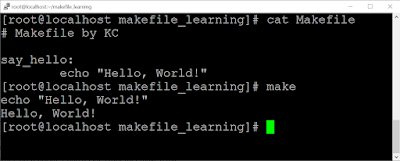
Make Tool Introduction If you've ever installed software for a Unix-based system by compiling from source, you would have run commands such as 'make compile'. Make is a build automation tool that automatically builds executable programs and libraries from source code by reading files called Makefiles. Let's look at how it works. Simple Example Fig. 1 - Basic Example Code Snippet Here are the key points: We start by creating a ' Makefile ' in the directory.  A Makefile has recipes that use the prerequisites to make the target . target: prerequisites <TAB> recipe We can run the 'makefile' by running the 'make' command at the command line. The make command runs the default target which is also called the 'default goal'. The prerequisites can be files or just a name for recipes, in which case they are called " phony targets ". A few more points to keep in mind: As we can see from the example in fig. 1, the recipe, 'echo ...

Quick post about using Docker for setting R7 Repositories on an R8 VM

Image
A repository is much like a library for the operating system. Had a fun task at work today so wanted to write a quick post about it. A linux system receives its OS and software updates from a location called the 'Repository', for an Operating System such as CentOS or Ubuntu, the repositories come pre-listed with the operating system and there's no addition work involved. Fig. 1 - Ubuntu repolist However, for the Red Hat operating systems which are paid, you need to manually register the system to the Red Hat customer portal and then need to attach a subscription. The command to do so looks like the following:  subscription-manager register --username <username> --password <password> --auto-attach Doing so will give us access to the repositories from which we can install our packages and update existing ones. As you can imagine, different versions of Red Hat would have different repositories and they wouldn't be interoperable. If any of you have tried install...